

Retrieval-Augmented Generation (RAG) systems fail when relevant documents never reach the model. We’ve debugged dozens of platforms where the LLM behaved perfectly but retrieval missed IDs, ignored metadata, or leaked data between customers. This spoke is about the retrieval and semantic-search layer; pair it with the platform-wide AI Platform Security Guide for broader controls. Retrieval-Augmented Generation (RAG) combines a vector database, semantic search, and your LLM so answers stay grounded in your data instead of model guesses-enterprise buyers don’t ask which embedding model you chose, they ask how you isolate tenants, test retrieval accuracy, and monitor drift.
This guide shares the RAG architecture we deploy on Next.js AI platform engagements. It balances product velocity with the security, observability, and testing patterns that satisfy SOC 2 and vendor security questionnaires.
Spoke: This article is the retrieval/data-plane spoke. For the full AI platform security architecture (tenancy, agents, observability), see the pillar AI Platform Security Guide.
What you’ll learn
- End-to-end RAG system blueprint (ingestion → retrieval → generation).
- Multi-tenant data modeling and security controls.
- Hybrid retrieval orchestration without leaking tenants.
- Observability, evaluation, and incident response patterns.
- Implementation roadmap so you can ship iteratively.
Need hands-on help implementing this architecture? Schedule a call and we’ll design the system for your use case.
Semantic Search vs Keyword Search in RAG Pipelines
Keyword search matches literal terms and is predictable but brittle when phrasing changes. Semantic search uses embeddings to match meaning-which is powerful but can over-retrieve “related” content unless you constrain it. In production RAG, you usually combine both: keyword filters for hard constraints (tenant_id, document type) plus semantic similarity for ranking inside that filtered subset. That keeps recall high without leaking the wrong tenant’s data.
-architecture.webp)
RAG architecture showing document ingestion, vector search, and LLM integration.
1. RAG system blueprint
Think in layers, not ad hoc scripts:
- Content ingestion - normalize sources (Docs, tickets, wikis), extract metadata, chunk text.
- Indexing - create embeddings and keyword indexes with tenant-level namespaces.
- Retrieval orchestration - hybrid search (vector + keyword), reranking, safety filters.
- Response generation - compose prompts, inject context, enforce output policies.
- Observability - log retrieval events, tool usage, costs, and security signals.
- Testing - automated eval harness per release, adversarial cases, regression suite.
Treat each layer as a product surface with owners, alerts, and documentation. When retrieval drifts, you need clear blame boundaries to fix it fast.
FAQ: RAG Architecture
What is Retrieval-Augmented Generation (RAG) in simple terms?
RAG lets an LLM answer questions using your own data. When a user asks something, the system retrieves relevant documents or chunks from a vector store and feeds them into the model. The LLM then produces an answer grounded in that context.
When should I use RAG instead of fine-tuning?
Use RAG when your data updates frequently, when you want strong guardrails around what the model can reference, or when you need different tenants to see different knowledge bases. Use fine-tuning only when behavior itself must change, not content.
How do I prevent RAG from leaking data between tenants?
Always filter the vector-store retrieval query by tenant or access scope before similarity search. Tenant filters + RLS + per-tenant collection IDs are the foundation of safe multi-tenant RAG.
Why does chunking strategy matter so much?
Chunk size affects recall, answer accuracy, cost, and latency. Too large → irrelevant text pollutes results. Too small → you miss important context. Most production systems use dynamic chunking or semantic chunk boundaries.
What is “hybrid search” and when should I use it?
Hybrid search combines keyword search (BM25) with semantic similarity. Use it when you need both: strict filters on document type or tenant AND semantic scoring inside those constraints.
How do I keep my RAG system from returning stale data?
Use timestamp-based re-indexing, soft-deletes that mark stale records, and ingestion pipelines that automatically rebuild impacted embeddings. Always propagate deletes to the vector index.
2. Content ingestion & chunking
Ingestion is usually the quiet cause of bad retrieval. The architecture we use:
- Source adapters publish normalized records (
{ tenant_id, source_id, html, metadata }). - Normalization workers handle cleaning (HTML stripping, table parsing, image OCR if needed).
- Chunkers split content using semantic-aware strategies (headings, bullet boundaries) instead of fixed token sizes.
- Metadata enrichment attaches tags, ACLs, and freshness signals.
Best practices
- Treat ingestion as idempotent. Re-run pipelines without duplicating content.
- Store raw + processed versions for audit. You’ll need proofs during incident reviews.
- Version your chunking strategy. When you change chunk sizes or formatting rules, update downstream caches and rerun evaluation.
- Capture source attribution (URL, author, timestamps). Helpful for citations and debugging.
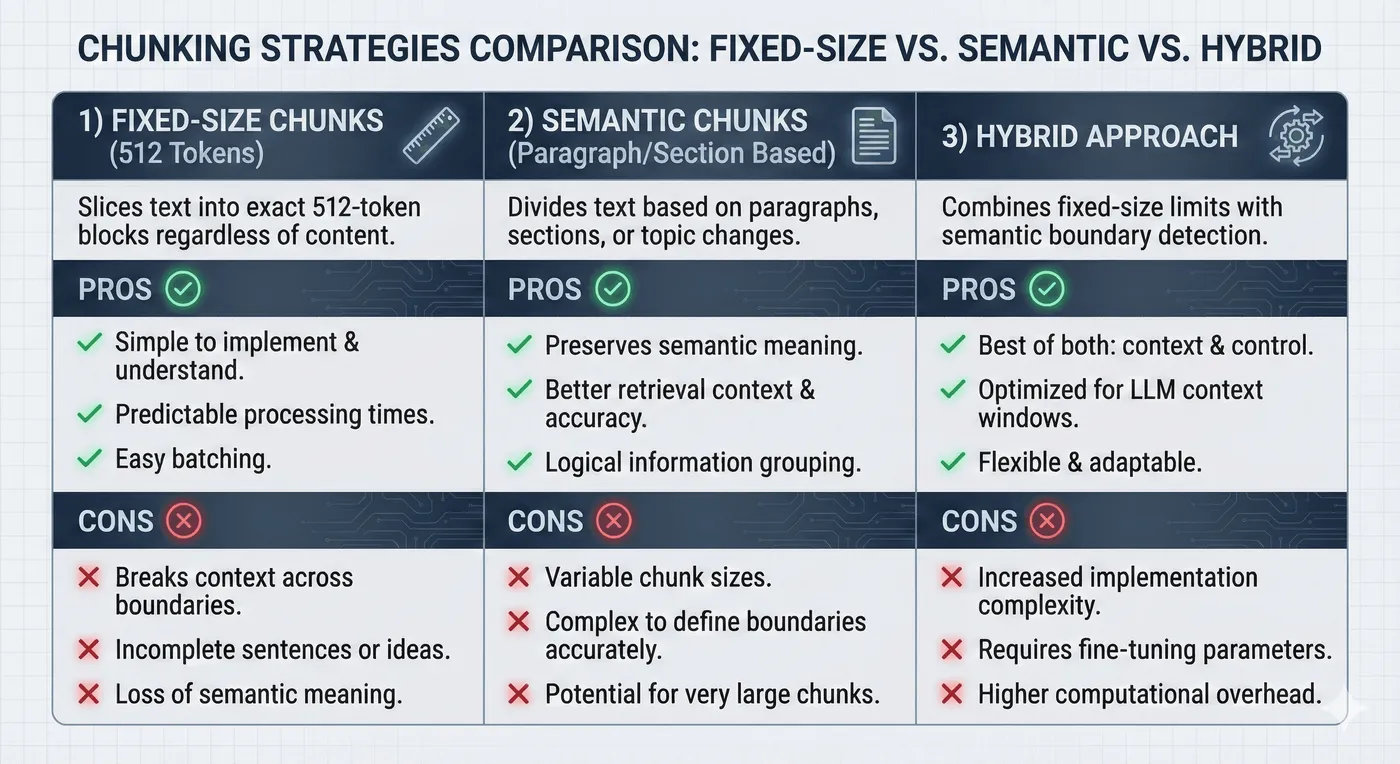
Comparison of document chunking strategies: fixed-size, semantic-aware, and hybrid approaches for RAG systems.
Tenant isolation starts here: tag every record with tenant_id and enforce validation before anything hits the index. Never trust upstream data without explicit tenancy.
3. Indexing strategy
You need both semantic and lexical indexes.
Vector index
- Stack: Postgres + pgvector up to ~100M vectors, or managed vector DB (Qdrant, Pinecone) for larger deployments.
- Metadata: store
tenant_id,source_id,chunk_id, embeddings, tags, timestamps. - Isolation: namespace by tenant or enforce filters at query time (prefer both).
- Maintenance: monitor dimensionality drift when models change; re-embed proactively.
Keyword index
- Stack: Postgres
tsvectorfor ≤10M docs, Elasticsearch/OpenSearch for bigger workloads, Algolia if you want managed search. - Use cases: IDs, SKUs, legal phrases, numeric values that vectors miss.
- Security: apply the same tenant filters you use for vectors; teams often forget this and leak data through keyword search.
Metadata indexing
- Use JSONB or KV stores for filters (product line, geography, lifecycle stage).
- Keep indexes lean. Over-indexing every metadata field hurts write performance.
- Align metadata taxonomy with your product’s RBAC model so prompts can request “only premium-plan documents” without brittle string matching.
4. Retrieval orchestration & hybrid search
The retrieval controller is the brain of RAG. This section covers the full hybrid search architecture-combining vector and keyword search, tuning fusion strategies, reranking, and optimizing performance.
Hybrid search architecture overview

Tenant isolation hooks exist at sanitize/classify, inside each search engine, and again after fusion. One layer fails? The next stops cross-tenant leakage.
Vector search: when it works (and when it doesn’t)
Vector search shines when wording changes but meaning doesn’t. It handles synonyms (“cheap hotels” → “affordable accommodations”), paraphrasing, multilingual queries, and fuzzy intent better than keyword search.
Strengths
- Semantic similarity: embeddings cluster related ideas even if vocabulary differs.
- Intent understanding: queries like “how do I refund a customer?” retrieve policy documents even if the phrase “refund” isn’t present.
- Language flexibility: cross-lingual embeddings let Spanish queries retrieve English content.
Limitations in production
- The ID problem - When users ask “What’s the status of ticket TKT-9823?”, vector search sees tokens (“TKT”, numbers) and retrieves semantically similar tickets (TKT-9824) rather than the exact ID. Keyword search answers instantly.
- The jargon problem - Legal/medical acronyms have precise meaning. Vectors blur “HIPAA” and “HITRUST” together. Keyword search keeps them distinct.
- The freshness problem - Users ask “What changed last week?” Vectors can’t reason about recency unless you add metadata filters. Without explicit
created_atscoping, they retrieve stale chunks.
Vector vs keyword vs hybrid comparison
| Capability | Vector only | Keyword only | Hybrid |
|---|---|---|---|
| Synonym handling | ✅ Excellent | ❌ Weak | ✅ Excellent |
| Exact IDs/codes | ❌ Misses | ✅ Perfect | ✅ Perfect |
| Multilingual | ✅ Strong | ❌ Weak | ✅ Strong |
| Freshness awareness | ⚠️ Needs metadata filters | ✅ Good (date filters) | ✅ Best of both |
| Setup complexity | Medium | Low | High |
| Typical latency | 50-200 ms | 5-50 ms | 80-300 ms |
Decision framework
- Vector-only works when: queries are conversational, synonyms matter more than exact matches, and ID lookups are rare.
- Avoid vector-only when: users reference IDs, product codes, regulatory language, or require recency guarantees.
- Hybrid required when: users search by IDs/SKUs/legal citations, corpus > 1M chunks, or need multilingual intent understanding.
Keyword search: precision at the cost of flexibility
Keyword search never forgets how something is spelled. Use it when exact phrases, IDs, or Boolean operators matter.
Strengths
- Exact matching: account IDs, SKUs, invoice numbers, email addresses.
- Boolean logic: combine clauses with AND/OR/NOT.
- Phrase queries: “customer success” stays together, unlike tokenized embeddings.
- Speed for small sets: Postgres
tsvectoror SQLite FTS handle millions of docs quickly.
Limitations
- No synonym handling (unless you build custom dictionaries).
- Typo-sensitive unless you add fuzzy matching or trigram indexes.
- Doesn’t understand intent (“top hotels” vs “best hotel deals”).
Technology choices
- Postgres
tsvector: built-in, great up to ~10M docs. Use generated columns and GIN indexes. - Elasticsearch/OpenSearch: when you need analyzers, fuzzy search, >10M docs.
- Algolia/Typesense: SaaS options with great UX, but you must solve tenant isolation carefully.
Hybrid search: orchestration and fusion
Hybrid search isn’t just “run both and hope.” You need deterministic orchestration.
Baseline pipeline
- Receive query - capture tenant context, locale, product area.
- Generate embedding - send sanitized query to embedding model; cache results.
- Prepare keyword query - parse IDs, apply stemming/fuzzy rules, build Boolean filters.
- Execute searches in parallel - vector DB + keyword engine, each limited to top 20-30 hits.
- Merge via scoring strategy - weighted scores, reciprocal rank fusion (RRF), or learned ranking.
- Apply policy filters - tenant_id, ACLs, document freshness.
- Return top N - include metadata and scores for observability.
Scoring strategies
Weighted combination
hybrid_score = (vector_score * 0.7) + (keyword_score * 0.3)
Best when both systems produce comparable score ranges. Tune weights via evaluation datasets.
Reciprocal Rank Fusion (RRF)
score = Σ 1 / (k + rank) with k ≈ 60. Focuses on rank order, not raw scores. Useful when score scales differ drastically or when one system returns zero scores (e.g., keyword-only hits).
Learned fusion Train gradient-boosted trees or small neural models that take vector score, keyword score, metadata (freshness, doc type) and output relevance. Requires labeled data (clicks, human judgments) and ongoing retraining.
Weight tuning guidelines
- Narrative content (blogs, docs): 80/20 or 90/10 vector vs keyword.
- Mixed corpora with IDs & instructions: 60/40 or 50/50.
- Highly regulated/legal content: 40/60 or 30/70 keyword dominance.
Run offline evals with historical queries to pick weights. Then A/B test in production with guardrails.
Reranking: the last mile of precision
After hybrid fusion, you’ll usually have 20-30 candidates. Reranking lets you reorder them using heavier models that consider query + document jointly.
When reranking helps
- Complex queries with multiple clauses (“Show Q4 refund policy for enterprise customers”).
- High-stakes answers (legal, medical, finance).
- When evaluation shows precision@5 below target even after hybrid tuning.
When to skip
- Simple FAQ chatbots with straightforward queries.
- Latency budgets under ~200ms end-to-end.
- Corpora with only a few hundred documents where search is already precise.
Reranking approaches
| Approach | Examples | Latency | Pros | Cons | Cost (approx.) |
|---|---|---|---|---|---|
| Cross-encoder API | Cohere Rerank, Azure Semantic Ranker, Voyage | 100-300 ms | High precision, fully managed | Per-call fees, vendor lock-in | $0.002-$0.01/query |
| Self-hosted reranker | BGE-Reranker, Sentence-T5 | 50-150 ms (depends on hardware) | Private data stays in your VPC, low marginal cost | Requires GPU/CPU capacity + ops | Infra + engineering |
| LLM-based judge | GPT-4o, Claude 3.5 for top K | 300-800 ms | Handles nuanced reasoning, can explain scores | Highest latency/cost | $0.02-$0.10/query |
| Learned fusion model | XGBoost/CatBoost on click data | < 50 ms | Tailored to your corpus, cheap at runtime | Needs labeled data + retraining pipeline | Training + maintenance |
Measurement
- Precision@K (are top K relevant?).
- Mean Reciprocal Rank (MRR).
- Normalized Discounted Cumulative Gain (NDCG) if you have graded relevance.
- User engagement: click-through rates on first result, fallback to keyword-only, etc.
If reranking doesn’t improve metrics by ≥10%, skip it-you’re trading latency and cost for minimal benefit.
Prompt integration
- Keep system prompts immutable; pass retrieved context as separate sections with citations.
- Annotate each chunk with metadata (source, timestamp, tenant). Helps output filters reject wrong-tenant content.
- Guardrails: output filtering to redact secrets, detect mention of other tenants, and enforce compliance language.
5. Security & multi-tenant controls
Security isn’t an afterthought-it’s the architecture.
Tenant isolation
- Enforce row-level security in the database. Application bugs happen; RLS catches them.
- Apply tenant filters before similarity search, not after. Retrieval pipelines that filter later still bring other tenants’ embeddings into memory and can leak via prompt manipulation.
- Validate retrieved chunks against requesting tenant before sending to the LLM. Fail closed: if tenant context is missing, stop the response.
- Cache per tenant and include tenant ID in cache keys. Shared caches are a common leakage point.
Prompt injection defenses
- Maintain layered defenses: input sanitization, instruction hierarchy (system > developer > user), output filtering, automated adversarial testing.
- Log every detection event with tenant/user context. Use metrics to spot campaigns.
Tool security
- If agents/tools enrich retrieval (SQL lookups, CRM fetches), enforce RBAC and argument validation. Don’t let LLMs pass arbitrary tenant IDs into tools.
- Log tool invocations with sanitized arguments for audits.
Compliance
- Map controls to SOC 2/GDPR requirements: document RLS policies, eval results, and incident response plans.
- Keep secrets (LLM keys, database creds) in secret managers; never bake into client bundles.
6. Observability & monitoring
You can’t improve what you don’t instrument.
Data you must log
- Query text (sanitized) + tenant/user IDs.
- Retrieval type (vector, keyword, hybrid) and latency.
- Chunk IDs returned, scores, and metadata.
- Reranking decisions (if applied).
- Guardrail verdicts (blocked, sanitized, passed).
- Costs per query (tokens, rerank usage).
Dashboards
- Precision/recall trends per tenant.
- Cross-tenant access attempts (should be zero).
- Retrieval latency percentiles (p50/p95/p99).
- Prompt injection detection volume.
- Token/cost burn-down per customer (detect runaway usage).
Alerting
- Abnormal spike in token usage for a tenant.
- Retrieval latency > SLA for X minutes.
- Guardrail triggered >N times/hour.
- Cache miss ratio anomalies (signals ingestion drift).
Centralize logs in PostHog or Datadog so security and engineering teams share visibility. Structured logs make compliance reporting easier.
7. Testing & evaluation
Treat retrieval like any other mission-critical subsystem: version-controlled tests, automated evals, and regression budgets.
Eval harness
- Create dataset of
{ query, expected_chunks, acceptance_threshold }. - Nightly job runs retrieval pipeline, compares outputs, and reports precision@k, recall@k, MRR.
- Track baseline vs latest run; fail the build if metrics drop beyond tolerance.
Security tests
- Simulate cross-tenant requests with synthetic data.
- Attempt prompt injections specifically targeting tenant leakage.
- Validate keyword search filters (common omission).
- Run penetration tests quarterly (or before enterprise launches).
Performance tests
- Load test with realistic traffic mix (FAQ vs investigative queries).
- Stress caches and embedding services.
- Test fallback behavior when embeddings API fails-do you degrade gracefully or crash?
Manual QA
- Review random queries weekly to catch qualitative issues (tone, hallucinations, new intents).
- Pair customer success and engineering for feedback loops.
8. Cost modeling
RAG costs span ingestion, storage, and inference. Estimate upfront so finance isn’t surprised.
Embeddings
text-embedding-3-small: ~$0.02 per 1K tokens. A 10M-token corpus (roughly 5,000 medium documents) costs ~$200 to embed once.- Re-embedding cadence: quarterly if content churns rapidly; budget accordingly.
Vector storage
- pgvector: Postgres storage + compute (20 GB of embeddings ≈ $20/month on typical managed Postgres).
- Managed vector DBs: Pinecone/Qdrant/Weaviate charge ~$0.25-$0.60/GB/month plus query fees.
Reranking & LLM calls
- Cross-encoder APIs: $0.002-$0.01 per query when reranking top 20 results.
- LLM completions: GPT-4o mini style responses cost ~$0.01-$0.03 per answer; premium models cost more.
Optimization levers
- Cache frequent queries per tenant to reduce vector/RAG costs.
- Batch re-embeddings when ingesting large corpora.
- Use smaller models (GPT-4o mini, Claude Haiku) for low-stakes answers; reserve premium models for high-value workflows.
Track per-tenant costs in PostHog or your billing system so pricing plans align with actual usage.
9. Performance targets & SLAs
- Latency budgets: aim for <1s for FAQ-style queries (heavy caching), <2s for investigative queries with vector + rerank.
- Throughput: monitor QPS per tenant; design for burst capacity (e.g., 10× normal load) at peak events.
- Cache hit rate: target >60% for FAQ queries; anything lower suggests you’re not caching the right surfaces.
- Scaling thresholds: move from pgvector to dedicated vector DB around 100M embeddings or when write-heavy workloads cause contention.
- Geo-distribution: co-locate vector DBs and LLM endpoints with the user region to cut latency; replicate indexes across regions if necessary.
Publish internal SLAs (per tier) covering latency, availability, and accuracy so stakeholders know what “good” looks like.
10. Failure modes & graceful degradation
- Embedding service down: queue requests and fall back to cached embeddings. Warn the user if fresh content can’t be indexed.
- Vector DB unavailable: continue serving cached answers or keyword-only search; log incidents for visibility.
- LLM rate limiting: return cached responses or degrade to templated answers (“We’re seeing high load; here’s the best match from your docs”). Alert operations to increase quotas or throttle tenants causing spikes.
- Prompt guardrail failures: if output filters keep blocking responses, surface a safe error message and alert security-might indicate an injection campaign.
- RAG drift: when evaluation metrics drop, auto-roll back to the last good index snapshot while investigating.
Document these scenarios in runbooks so on-call engineers know exactly how to respond.
11. FAQ
How do I choose between pgvector and a managed vector DB? Start with pgvector if your dataset <100M embeddings and you want simplicity. Move to managed DBs when you need multi-region replication, lower latency at scale, or offload ops. Most B2B SaaS platforms stay on pgvector until they hit 100M+ embeddings or need multi-region deployment.
What chunk size should I use?
Start with 300-600 tokens per chunk. Smaller chunks improve precision but increase embedding cost. Always store chunk boundaries (headings) so you can reconstruct context in outputs.
How often should I re-embed content?
Re-embed when: models change (new embedding model), documents update, or evaluation metrics degrade. For most SaaS platforms, quarterly re-embeddings plus on-change updates strikes a balance.
When do I need reranking?
Add reranking when hybrid search precision @5 is <80% or when queries are multi-part/complex. Use cross-encoders for day-to-day, LLM rerankers for high-value workflows, and skip entirely if evaluation shows little improvement.
How do I prevent multi-tenant leakage?
Combine RLS, per-tenant caches, chunk validation, and prompt guardrails. Reference the Multi-Tenant SaaS Architecture guide for schema patterns and the AI platform security guide for guardrail specifics.
8. Implementation roadmap
Ship RAG in phases to reduce risk.
| Phase | Deliverables | Notes |
|---|---|---|
| 0 - Foundations | Tenant-aware schema, ingestion baseline, eval harness scaffolding | Document threat model & success metrics. |
| 1 - MVP RAG | Vector search, guardrails, simple prompt template | Limit rollout to internal users, collect feedback. |
| 2 - Hybrid + Observability | Keyword search, score fusion, logging dashboards | Add alerting + cost tracking. |
| 3 - Reranking & Security Hardening | Cross-encoder rerankers, adversarial tests, cache strategy | Run pen test before production go-live. |
| 4 - Optimization | Auto-scaling ingestion, fine-grained ACLs, multi-region | Introduce chaos testing + quarterly reviews. |
Each phase ends with documented tests, metrics, and runbooks. Investors and enterprise buyers want proof that you operate like a mature platform.
Case study: tenant-safe RAG under vendor review
- Platform failed a vendor security review because RAG could surface deprecated docs.
- Rebuilt ingestion lineage, enforced tenant filters before vector search, and added age-based decay.
- Result: passed review without a full reindex and gained audit-ready retrieval logs.
Quick FAQs
- How do I keep RAG from leaking cross-tenant data? Filter by tenant before similarity search, use tenant-scoped indexes/namespaces, and enforce RLS at the vector store API layer.
- Is semantic search enough, or do I need hybrid? Hybrid is safer: keyword/BM25 for hard constraints, semantic for ranking. It reduces semantic drift and improves precision.
- How do I handle deletes and stale content? Use soft deletes with tombstones, periodic vacuuming of vectors, and reindex on source updates. Track chunk lineage so you can surgically remove bad data.
9. Conclusion & CTAs
Production RAG requires layered architecture:
- Robust ingestion and indexing strategies.
- Hybrid retrieval tuned to your corpus.
- Security-first mindset (tenant isolation, guardrails, tool RBAC).
- Observability and evaluation loops to catch regressions.
- Implementation roadmap that balances speed and safety.
Ready to build or audit your RAG platform?
Option 1: Next.js AI Platform Development
Full-stack RAG implementations with security, observability, and compliance.
👉 View Next.js AI Platform Development →
Option 2: AI Security Consulting
Security review + adversarial testing for existing RAG systems.
Option 3: Technical consultation
Need architecture guidance before committing to a project? Book a call and we’ll map your requirements.
Free resource: RAG Implementation Checklist - Complete readiness scorecard covering ingestion, hybrid search, security, and evaluation metrics.
Related resources
See Also
- AI Platform Security Guide - full system-wide architecture
- AI Agent Architecture - tool orchestration & guardrails
- LLM Security Guide - LLM-specific threat modeling
- Penetration Testing AI Platforms - how AI products are tested
- Multi-Tenant SaaS Architecture - tenant isolation & RLS